What’s new
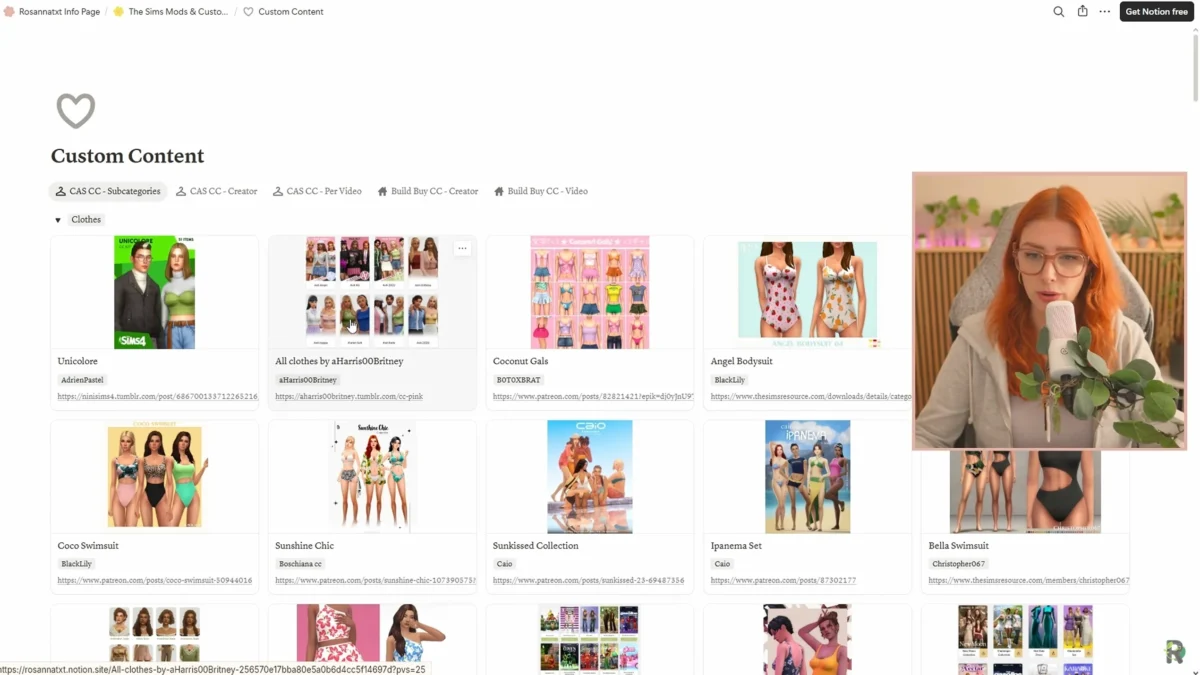
Rosanna rebuilt her entire Sims 4 custom content hub so CC shopping feels like… shopping, not scavenging. Instead of long lists of plain links, you now get a visual, searchable database with pictures, categories, creator grouping, and direct download links. It mirrors the clean structure of her popular mods database and lives on her website under The Sims Mods and Custom Content.
Where to find it
Head to her website’s The Sims Mods and Custom Content page. At the top you’ll see:
- Navigation shortcuts to CC pages and the mods index
- Important tutorials for beginners (mod setup, folder organizing, broken CC, etc.)
- Big visual databases for CAS and Build/Buy CC, each with filters and creators
How it’s organized
You can browse in a few smart ways, depending on your mood:
Cas cc by subcategory
Open just the bits you need with collapsible sections: clothes, shoes, hair, brows, lashes, makeup, eyes, tattoos, skin details, skin blends, and more. Each item has a thumbnail and a one-click download link, so you aren’t juggling a video and 20 tabs.
Cas cc per creator
Prefer to shop by maker? Every piece she’s featured is grouped under its creator, even if it appeared in different videos. Use it to binge a favorite artist’s catalog.
Cas cc per video
Following along from YouTube? Each showcase video has its own gallery, with every item pictured and linked.
Build/buy cc (per creator or per video)
Build/Buy often mixes décor, furniture, and clutter, so she skipped deep subcategories here. Instead, browse per creator or per video (her “Best Maxis Match Build/Buy CC” parts 1–6 and counting). Each card shows thumbnails and download links right on the front.
Smart browsing features
- Global search: Type a creator (e.g., “Sorrus”), item type (e.g., “bikini”), or name to surface matching entries across the whole database.
- Load more: Long creator lists paginate neatly. Click Load more to reveal additional entries.
- Quick open: Most cards show the download link on the face, but you can open any card to see a short description, last updated date, and a link to the original showcase video.
Why this helps (practical wins)
- Visual shopping: Thumbnails mean faster decisions.
- Cross-video continuity: A creator featured in multiple showcases still appears as one tidy block.
- Back-catalog friendly: If you’re catching up months later, you don’t have to rewatch everything to find that one sweater set.
- Beginner friendly: The tutorials section keeps first-timers from borking their Mods folder.
Bonus: storytelling tools (sponsored)
Alongside CC, Rosanna highlights The Sims Tree, a family-tree and storytelling tool that:
- Tracks relationships across save files and lets you link trees for complex lore
- Supports avatars per lifestage, so portraits update without losing earlier versions
- Offers a Sim diary to log day-to-day gameplay (great for rotational players)
- Is highly customizable (tree lines, icons, wallpapers, and Sim info panel)
If you want a tidy, living record of your dynasties, it pairs well with a curated CC library.
What’s next
Rosanna will keep migrating and adding items and plans to continue tagging updates so you can spot newly added CC at a glance. She’s also inviting creator suggestions: drop your favorite Maxis Match artists (CAS or Build/Buy) in the comments of her video so she can add them to the database and future showcases.
Pro tips for smoother CC sessions
- Start with her tutorials if you’re new to mods/CC.
- Download in small batches and test in game to catch conflicts early.
- Keep a “new” folder in Mods so you can quickly remove recent additions if something breaks.
- Backup before big hauls.
Source: Rosannatxt — https://www.youtube.com/watch?v=C3MhFFdpjoY&ab_channel=Rosannatxt
FAQ: Rosanna’s Sims 4 CC database
How is the new CC database different from the old link lists?
The old version was just plain text links. The new database shows images, categories, and search options so you can browse visually and filter by type, creator, or video.
Can I still find CC from specific YouTube videos?
Yes. Each showcase video now has its own section in the database, with every item pictured and linked.
Is the database only for CAS CC?
No. It covers both CAS and Build/Buy CC. CAS has subcategories like clothes, hair, makeup, and tattoos, while Build/Buy is grouped by creator or video.
Can I shop by CC creator instead of by item type?
Yes. The database groups all content by creator, even if their work was featured across multiple videos.
Do I need to watch the videos to download CC?
No. All downloads are available directly in the database, but each card also links back to the original video if you want context.
Is it only for Maxis Match CC?
Yes. Rosanna uses and features exclusively Maxis Match CC, not alpha-style custom content.
Can I search for a specific item in the database?
Yes. You can type in keywords like “bikini” or a creator name, and the database will pull up every matching entry.
Will Rosanna keep updating the database?
Yes. She plans to keep adding new CC from her showcases and may also highlight “newly added” content so you can easily see what’s fresh.