Creating great looking male Sims takes a different touch than making females, and Alyce shows exactly how she builds a standout look from a solid base to final styling. Here is her step-by-step approach, the tools she leans on, and the small tweaks that make a big difference.
Start with a workable base Sim
- Strip distracting items: remove hair, beards, makeup and clothing to judge bone structure cleanly.
- Lengthen the face slightly, then nudge jaw and chin forward so the profile reads stronger.
- Use sliders as needed, but verify they are up to date for your game version.
Eyebrows set the tone
- Men’s brows carry a lot of personality. Avoid one “perfect” arch for every Sim.
- Pick fuller, slightly messy brows for realism, then refine in detail mode: lower the arch, widen slightly, pull the tail back.
- Reduce opacity a touch if the skin overlay darkens them too much.
Eyes first, then skin
- Choose eye textures before skin so you can match the overall vibe. Alyce often uses Obscurus and NSW eye sets for a clear, defined iris.
- Lean into subtle mystery: slightly lower and narrow the eyes to soften the gaze, then fine-tune lids in detail mode.
Skin pipeline that always reads realistic
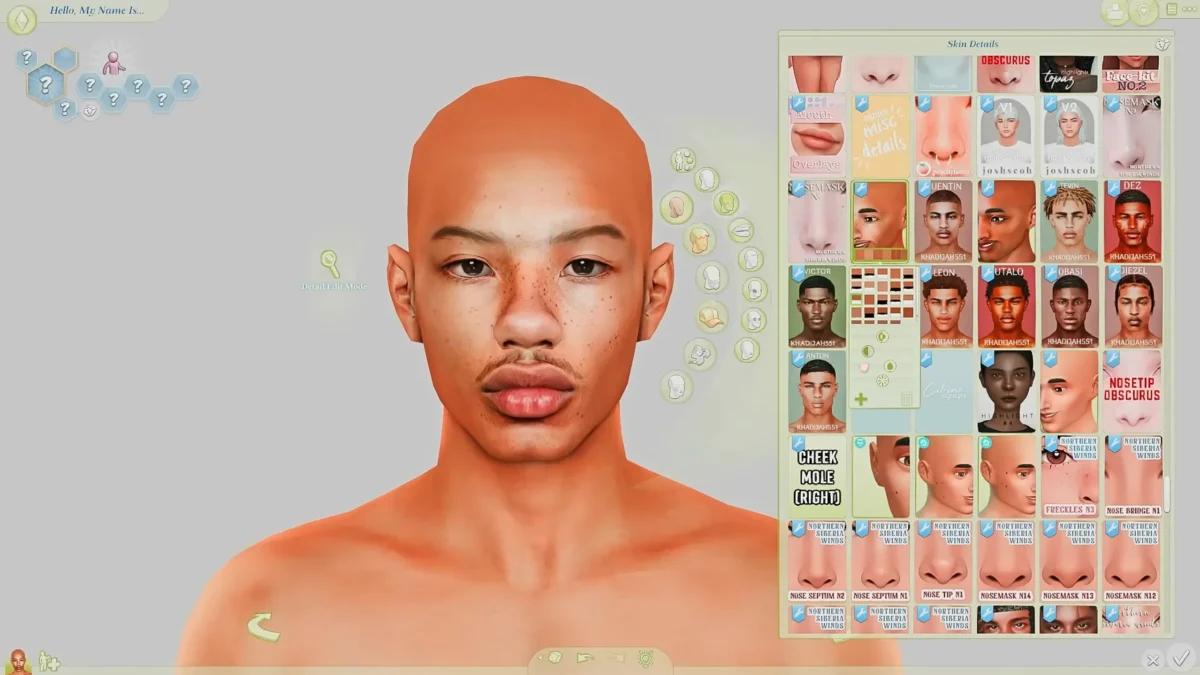
- Skin tones: try more cool and neutral tones, not only warm. Custom sliders like Nasori’s help land natural undertones.
- Base skins: Northern Siberia Winds (NSW) is Alyce’s go-to starting point for consistent, game-friendly results.
- Optional overlays:
- Obscurus overlays can add drama, but blend carefully so they do not look like a full alpha skin.
- Fashion Sensa overlays can be beautiful layered lightly, or try Cadia overlays for subtle texture and freckles.
- Prioritize a “Maxis-match friendly” finish even when mixing overlays. Adjust hue and opacity until it looks like one skin, not three.
Lips that fit the face
- Sometimes base game lips scale best, especially for fuller shapes.
- Favorites include NSW and Obscurus lip presets.
- Soften the cupid’s bow and gently inflate the bottom lip to avoid over-sharp corners.
- Use a lip mask (e.g., SunnyXO) to add hydration without a glossy look.
The nose sells realism
- Men’s noses define the silhouette. Alyce cycles through Complex, Obscurus and NSW nose presets, then tunes bridge width, nostril flare and tip.
- If a preset slightly warps lips or cheeks, revisit after your skin overlay is set.
- Add nasal definition with Pixis or Nasori detail kits for pores and highlights that sit naturally.
Layer every detail you can
Alyce stacks subtle details across categories for depth:
- Jawline booster (e.g., Golyhawhaw) for a firmer angle.
- Pixis face kit for nose and lip edge definition.
- Nasori “Little Details” for eye corners, nose edges and small shadow work.
- Pore maps (e.g., ODO) for controlled skin texture.
- Highlighter: Nasori Citrine to lift the nose bridge and forehead with a soft matte sheen.
- Freckles and moles: NSW and Peachyfaerie sets layered lightly so they look like part of the skin, not stickers.
Lashes and eyes complete the gaze
- MM Sims male lashes add a natural curl that reads well in CAS and in gameplay.
- Use an eye mask overlay such as Marigold to sharpen sclera and iris edges beneath your chosen eyes.
Hair, beards and face jewelry
- Beards: Kada (Cadia) beards are Alyce’s everyday staple. BrandySims and Euno often look great but check how they align with chin structure and hairlines.
- Hair:
- For locks and braids, EHMS and BattySims are reliable.
- Kada has strong Maxis-match and alpha options, with male cuts that frame the face cleanly.
- Earrings and piercings: add sparingly to emphasize a strong jaw or cheekbone, then revisit if they fight with hair volume.
Body presets and fixing torso seams
- Body presets: Obscurus plus Golyhawhaw sets provide balanced frames that read athletic without over-bulk.
- Chest and belly transitions can show seams with certain skins. If your overlay exposes the navel area, disguise it with:
- A light torso hair tattoo, or
- A subtle body overlay that covers the seam without heavy shine.
- Adjust shoulder width and clavicle for posture. A small push outward helps shirts sit better across the chest.
Finishing passes that sell the Sim
- Face shadow: SinMandy face shadows bring soft depth around eyes and nose.
- Revisit brows: reduce opacity 10–20% and polish the arch.
- Micro-tweaks: tap through nose bridge, philtrum depth, mouth corners and eye tilt one last time.
- Save variations: if you try a new overlay or beard, save a CAS copy so you can compare easily.
Creator roll call from Alyce’s toolkit
- Skins and overlays: Northern Siberia Winds (NSW), Cadia, Fashion Sensa, Obscurus
- Detail kits and sliders: Pixis, Nasori, ODO, Golyhawhaw, Complex
- Eyes and lashes: Obscurus, NSW, Marigold, MM Sims
- Hair and beards: Kada, EHMS, BattySims, BrandySims, Euno
- Extras: SunnyXO lip mask, SinMandy face shadow, Peachyfaerie freckles
Mindset tips for making men feel different
- Change eyebrows more than you think.
- Try at least two nose presets per Sim.
- Use a cool or neutral skin tone once in a while.
- Save three snapshots of the face at 45°, profile and ¾ view to spot sameness.
- Never be afraid to rework a feature after you add hair and beard. Hair changes everything.
Source: https://www.youtube.com/watch?v=n3vs4m64KTw&ab_channel=Alyce%27sWorld
FAQ: Creating male Sims in the Sims 4
Why is it harder to make attractive male Sims than female Sims?
Male Sims have fewer default CAS options, less CC variety, and subtler features, so you need to rely more on sliders, skins, and small details to achieve uniqueness.
What’s the most important feature to get right first?
Alyce emphasizes eyebrows and noses. Strong brows set personality, while the nose defines the silhouette and overall face balance.
Which creators does Alyce rely on the most?
Her staples are Northern Siberia Winds (NSW) for skins and lips, Obscurus for overlays and noses, Pixis for detail kits, and Cadia/Kada for beards and hair.
How do you fix the “belly button seam” problem with male skins?
Overlay subtle body tattoos or torso hair to disguise the seam. Some presets by Obscurus and Golyhawhaw also help smooth transitions.
Should I layer multiple skin overlays?
Yes, layering is common. Start with NSW as a base, then add Pixis or Nasori details. Blend carefully to avoid an overly “alpha” shiny look.
What’s the secret to making Sims look realistic instead of flat?
Stack small details in every CAS category: pores, face shadows, freckles, highlights, and subtle blush. Do many micro-adjustments—minor tweaks add up.
How can I make sure all my male Sims don’t look the same?
Rotate between different nose presets, experiment with cool-toned skin shades, change eyebrow shapes, and occasionally add piercings or distinct hairstyles.
Do male Sims look better with facial hair?
Usually yes. Alyce notes that good beards (especially from Kada/Cadia) add maturity and realism, but you should match the beard carefully to chin structure.
What mods help with final polish?
- Color slider mods to adjust undertones and overlays.
- Marigold eye mask for sharper sclera and iris.
- SunnyXO lip mask to soften lips.
- SinMandy face shadow for depth.