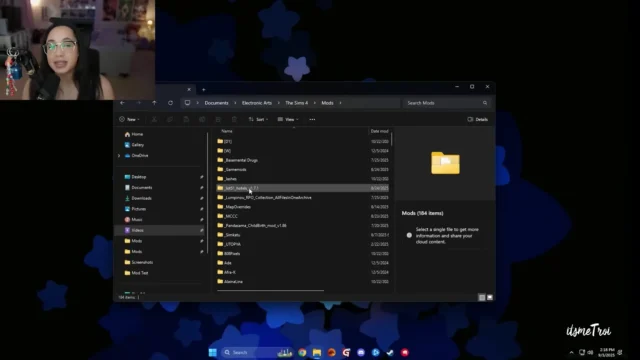
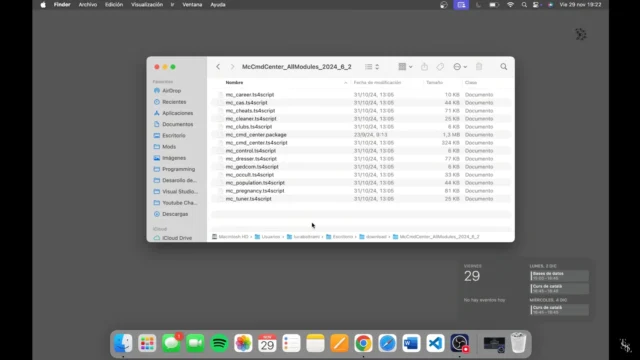
To install mods in The Sims 4, download the mod, unzip it if it comes as a .zip or .rar file, and move the files into Documents > Electronic Arts > The Sims 4 > Mods. Then open Game Options > Other, tick Enable Custom Content and Mods (and Script Mods Allowed for script mods), and restart the game. Mods work on PC and Mac only, not on PlayStation or Xbox.
Step by step: install a mod on PC or Mac
- Download the mod from the creator’s own page. That means their website, Patreon or CurseForge. EA says to download only from a trusted source or creator, and that Maxis and EA do not screen or support mods.
- Unzip it. If the file is a .zip or .rar, extract it first. The game cannot read files that are still zipped.
- Open the Mods folder. Go to your Documents folder, then Electronic Arts, then The Sims 4, then Mods. If there is no Mods folder, start the game once and close it, or create the folder yourself (EA says you can).
- Move the files in. Put the .package and .ts4script files in the Mods folder (see the folder rules below).
- Start The Sims 4 and turn mods on. Open Game Options, select Other, and tick Enable Custom Content and Mods. For script mods, also tick Script Mods Allowed.
- Restart the game. The mods load on the next start.
Where is the Sims 4 Mods folder?
| System | Mods folder |
|---|---|
| Windows | Documents\Electronic Arts\The Sims 4\Mods |
| Mac | Documents/Electronic Arts/The Sims 4/Mods |
| PlayStation and Xbox | None. EA says mods are only available on PC and Mac. |
This is the only place the game looks for mods and custom content. Moderators on the EA Forums say the folder stayed in the same place after the move from Origin to the EA app. If your Documents folder syncs to OneDrive or iCloud, check that the Electronic Arts folder is the one inside the Documents folder the game actually uses.
Which file goes where
| File type | What it is | Where it goes |
|---|---|---|
.package | Custom content (hair, clothes, objects) and most gameplay tuning | Mods folder, subfolders are fine |
.ts4script | Script mods, for example MC Command Center or UI Cheats Extension | Mods folder, or at most one subfolder deep |
.trayitem, .blueprint, .householdbinary and similar | Lots, rooms and Sims from the Gallery or from creators | The Tray folder, next to Mods. Not in Mods |
.zip, .rar, .7z | Archives | Nowhere. Extract them first |
Folder rules that save you trouble
- Script files: at most one subfolder deep. A .ts4script in
Mods\CreatorName\works. InMods\CreatorName\Extra\it is ignored. - Package files can go deeper, but guides disagree on the exact limit (most say five subfolders). Keep it to two or three levels and you never have to think about it.
- Keep each mod’s files together, ideally in one folder named after the creator. When a mod breaks after a patch, you remove one folder.
- Read the creator’s install notes. Some mods need two files (a .package and a .ts4script) or another mod to work.
- Do not delete Resource.cfg. The game puts this small file in the Mods folder to tell itself where to look.
Prefer an app to do the sorting? See our guide to the Sims 4 mod manager options, including the CurseForge app.
After a patch: turn mods back on
When EA patches The Sims 4, the game turns custom content and script mods off and shows a warning. Script mods can break with a new game version, so check whether your mods have been updated before you tick the boxes again. Our Sims 4 mod status tracker shows which popular mods work with the current patch, and how to prepare your mods for a patch walks through patch day.
Mods not showing up? Check these
- Enable Custom Content and Mods (and Script Mods Allowed) are ticked, and you restarted the game afterwards.
- The files are unzipped and sit in the right Mods folder, not in a Downloads folder or a second “Mods” folder somewhere else.
- Script files are no more than one subfolder deep.
- The mod has been updated for the current game version.
- Lots and Sims files are in Tray, not in Mods.
Still broken? Follow our step-by-step guide to fix a broken Sims 4 Mods folder, including the 50/50 method for finding the bad file.
What to install first
New to mods? Start with a few well-known ones and add more later, so you can tell what causes a problem if one breaks. Our list of must-have Sims 4 mods links straight to each creator’s page.
FAQ
Can you get mods on Sims 4 for PS5, PS4 or Xbox?
No. EA says mods are only available for PC and Mac players and cannot be downloaded on PlayStation or Xbox.
Are Sims 4 mods safe?
Mods are made by players, not by Maxis, and EA does not check them. Download only from the creator’s own page or CurseForge, never from re-upload sites.
What is the difference between mods and CC?
EA uses “mods” as the umbrella term. Custom content (CC) adds things like hair, clothes and furniture. Game mods add or change features, such as new traits, cheats or interface changes, and some of them use script files.
Do I need to create the Mods folder?
Usually not. The game makes it the first time it starts. If it is missing, EA says you can create a folder called Mods inside Documents\Electronic Arts\The Sims 4 yourself.
Why did my mods stop working after an update?
The patch turned mods off, or a script mod needs an update for the new game version. Check the creator’s page and our mod status tracker before you turn them back on.
Sources
- EA Help: How to install Mods in The Sims 4 (steps, settings, consoles, safety)
- EA Forums: How to use Mods and CC (folder location, Script Mods Allowed, Tray files)